
GuideShopify EDI Integration
Shopify EDI Implementation Guide: Step-by-Step Setup to Go-Live in 2026
8 min readPublished JUN 30, 2026Updated JUL 23, 2026
SHELLY
CONTENT WRITER

Many Shopify merchants don't plan for EDI when they first launch. Early priorities are growing sales, streamlining fulfillment, and scaling operations; EDI usually becomes urgent later—when a retailer, distributor, marketplace, or B2B customer requires electronic document exchange. Then the question shifts from "Do I need EDI?" to "How do I add it to Shopify with minimal disruption?"
This implementation guide helps store owners, operations teams, and IT leaders plan and execute an EDI rollout. It covers trading‐partner requirements, choosing between connectors, custom builds, and managed services, plus workflow configuration, data mapping, transaction testing, and go‐live preparation. Whether you're connecting your first retail partner or modernizing an existing flow, the roadmap below will help you avoid common pitfalls and build a scalable EDI process for orders, inventory, invoicing, and shipping.
A. Understanding Shopify EDI Implementation
A Shopify EDI implementation is the process of connecting your Shopify store with retailers, suppliers, logistics providers, warehouses, and ERP systems using standardized EDI documents. It involves planning workflows, configuring data mappings, establishing trading partner connections, testing transactions, and preparing the solution for production.
Instead of manually entering orders, updating inventory, or creating invoices, EDI automates the exchange of business data between systems.
Common EDI transactions used in retail / ecommerce integrations include:
- EDI 850 – Purchase Order
- EDI 855 – Purchase Order Acknowledgment
- EDI 856 – Advance Ship Notice (ASN)
- EDI 810 – Invoice
- EDI 846 – Inventory Advice
- EDI 832 – Product Catalog
Once implemented, these documents flow automatically between trading partners and Shopify, reducing manual effort, improving accuracy, and accelerating fulfillment.
B. Planning Your Shopify EDI Architecture
A typical Shopify EDI implementation involves three layers:
1. Shopify
Shopify acts as the commerce platform where products, orders, customers, inventory, and fulfillment activities are managed.
2. EDI Platform
An EDI platform such as Zenbridge handles:
3. Business Systems
Additional systems often include:
- Ecommerce shipping platforms such as Shipstation, Shippo
- Accounting softwares such as Quickbooks
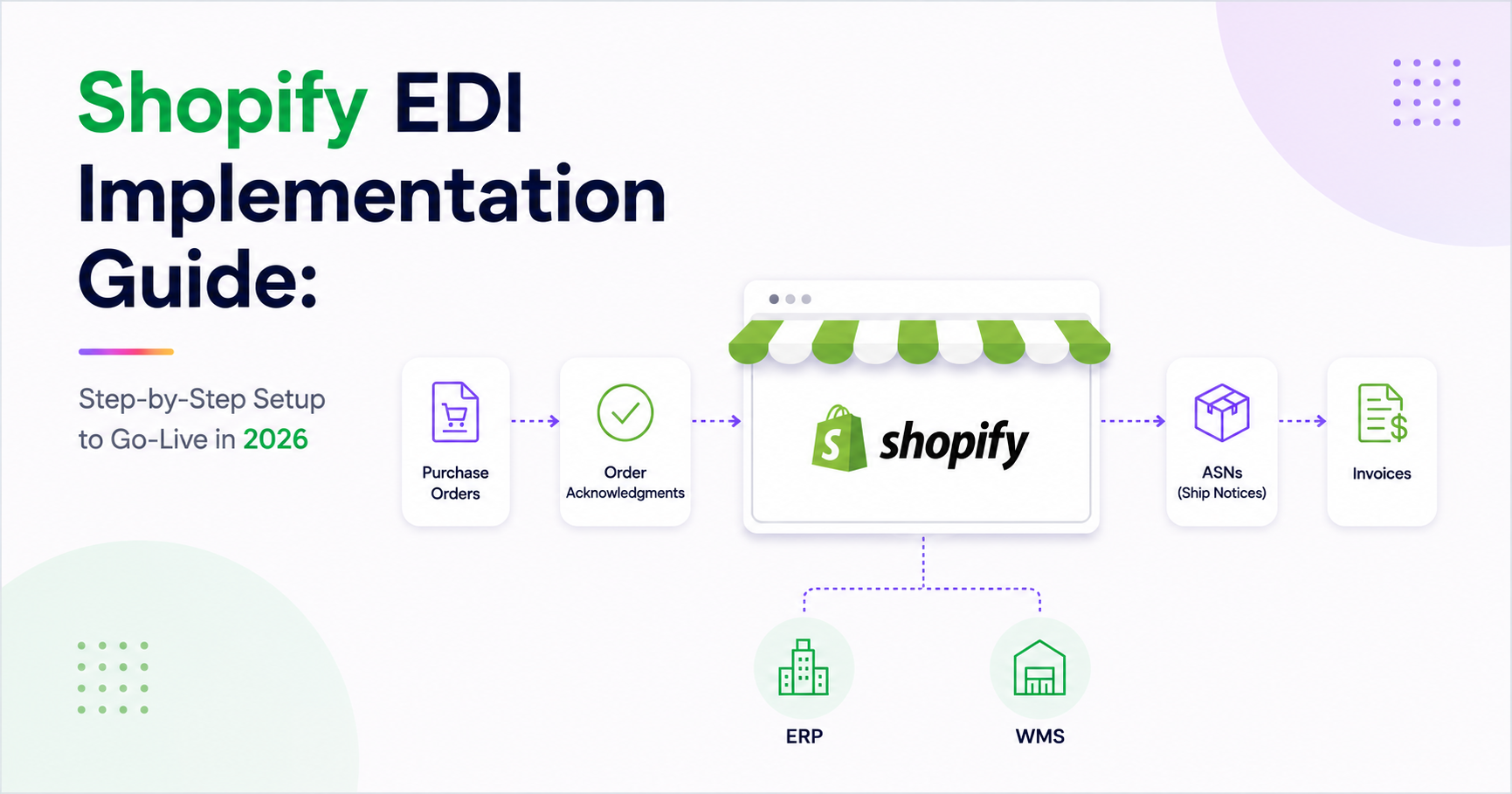
A typical workflow looks like this:
- A retailer sends an EDI 850 Purchase Order.
- The EDI platform translates the document and creates an order in Shopify.
- The order is fulfilled in Shopify.
- Shipment is managed through a shipping platform.
- Shipment information generates an EDI 856 Advance Ship Notice.
- An EDI 810 Invoice is transmitted to the retailer.
- Inventory updates continue to synchronize across systems.
In this architecture, Shopify manages commerce operations while the EDI platform handles compliance and document exchange behind the scenes.
C. Shopify APIs Used During EDI Implementation
Although Shopify does not provide native EDI processing, its APIs and automation capabilities make it an excellent platform for EDI-enabled commerce.
Key technologies used in Shopify EDI implementations include:
1. GraphQL Admin API
Shopify's recommended API framework for enterprise integrations.
Common use cases:
- Order creation
- Order updates
- Inventory management
- Product synchronization
- Customer management
2. REST Admin API
Provides support for legacy integrations and existing workflows.
3. Webhooks
Webhooks enable real-time communication between Shopify and external systems.
Common webhook events include:
- Order Created
- Order Updated
- Order Fulfilled
- Inventory Updated
- Product Updated
- Customer Updated
These events can trigger EDI workflows automatically without relying on manual intervention or scheduled batch jobs.
4. Bulk Operations API
Designed for:
- High-volume order processing
- Large inventory updates
- Product synchronization
- Enterprise-scale data exports
5. Inventory APIs
Support:
- Inventory synchronization
- Multi-location inventory tracking
- Inventory adjustments
- Available-to-promise inventory updates
6. Fulfillment APIs
Support:
- Shipment creation
- Tracking number updates
- Fulfillment status synchronization
- Warehouse integrations
Together, these capabilities allow EDI platforms to exchange data with Shopify in near real time.
D. Step-by-Step Shopify EDI Implementation Process
Successfully implementing Shopify EDI requires a structured approach.
Step 1: Identify Trading Partner Requirements
Start by understanding the requirements of each retailer or trading partner.
Key questions include:
- Which EDI standard is required e.g. ANSI X12 or EDIFACT?
- What transaction sets are mandatory?
- What SLA rules apply?
- What EDI connection method is preferred?
- Is certification testing required?
Understanding these requirements early helps avoid implementation delays later.
Step 2: Define Data Flows
Next, determine how information will move between Shopify and the EDI platform.
Typical flows include:
- Purchase Orders (850)- Retailer → EDI Platform → Shopify
- Inventory Updates (846) - Shopify → EDI Platform → Retailer
- Advance Ship Notices (856)- Shopify Fulfillment → EDI Platform → Retailer
- Invoices (810)- Shopify → EDI Platform → Retailer
Clear data flow design helps ensure accurate automation.
Step 3: Map Shopify Data to EDI Documents
Data mapping is one of the most critical implementation tasks.
Examples include:
| Shopify Data | EDI Field |
|---|---|
| Order Number | PO Number |
| SKU | Item Number |
| Customer Details | Buyer Information |
| Quantity | Ordered Quantity |
| Tracking Number | Shipment Information |
| Inventory Levels | Inventory Advice |
Accurate mapping reduces transaction failures and minimizes manual reconciliation.
Step 4: Configure Shopify Webhooks
Webhooks enable event-driven processing.
Typical triggers include:
- New orders
- Order updates
- Fulfillment confirmations
- Product updates
- Inventory changes
This allows EDI transactions to be generated automatically as business events occur.
Step 5: Establish EDI Connection with Trading Partner
Before connecting Shopify to your EDI platform, establish the technical communication protocol with your trading partner (retailer).
Common EDI Communication Protocols:
- AS2 (Applicability Statement 2) - Secure HTTP-based protocol with encryption and digital signatures
- SFTP (Secure File Transfer Protocol) - Encrypted file transfer over SSH
- OFTP (ODIFleet File Transfer) - European standard for EDI file transfer, supports compression
- X400 - Older message handling system protocol
This step ensures secure, reliable data exchange between your EDI platform and trading partners.
Step 6: Connect Shopify to an EDI Platform
At this stage, Shopify is connected through APIs and webhooks.
The integration layer handles:
- EDI translation
- Data transformation
- Trading partner communication
- Error handling
- Workflow automation
Platforms such as Zenbridge simplify this process through pre-built Shopify connectors and API-driven workflows.
Step 7: Test End-to-End Transactions
Before going live, every workflow should be tested.
Testing typically includes:
Order Testing
- Retailer sends an 850
- Order appears correctly in Shopify
Inventory Testing
- Inventory updates occur
- EDI 846 is generated successfully
Fulfillment Testing
- Shipment is completed
- ASN is generated correctly
Invoice Testing
- EDI 810 invoices are transmitted successfully
Many retailers also require formal certification testing before production deployment.
Step 8: Monitor and Prepare for Go-Live
Before launch:
- Review transaction logs
- Verify webhook functionality
- Validate inventory synchronization
- Confirm retailer certifications
- Establish exception handling procedures
Monitoring tools should be configured to quickly identify and resolve issues.
Step 9: Go-Live - Moving into Production
Once testing is complete, the integration moves into production.
During go-live:
- Retailer transactions begin flowing automatically
- Orders are created in Shopify
- Inventory updates synchronize in real time
- Shipment notifications are transmitted automatically
- Invoices are exchanged electronically
Businesses should closely monitor activity during the first few weeks to ensure a smooth transition.
E. Why Choose Zenbridge
Shopify provides powerful APIs and ecommerce functionality, but businesses still need an EDI layer for document translation, compliance management, and retailer connectivity.
Zenbridge simplifies Shopify EDI implementation by providing:
- Pre-built Shopify Connectors
- EDI-as-API Architecture
- Real-time Webhook Processing
- Faster Onboarding
- Simplified Retailer Connectivity
- Reduced Implementation Timelines
- Comprehensive Support
- Trading Partner Management
- Fast Production Changes
Whether you're integrating with Amazon, Walmart, Target, Costco, or other trading partners, Zenbridge helps automate the entire EDI workflow, from order receipt to shipment and invoicing.
F. Shopify EDI Implementation Success Stories
Case Study 1: Shenanigan Kids - 30% Error Reduction with Shopify EDI
Company Background: Shenanigan Kids is a fast-growing children's eCommerce brand selling on Shopify with orders from major retailers like Amazon and Walmart.
Challenges:
- High order entry errors (approximately 15% error rate)
- Delayed shipment notifications to retailers
- Inventory discrepancies across channels
- Retailer compliance chargebacks
Solutions:
- Connected Shopify to Zenbridge via GraphQL Admin API and webhooks
- Automated EDI 850 (Purchase Orders), EDI 856 (ASN), and EDI 810 (Invoices)
- Integrated with NetSuite for inventory synchronization
- Enabled real-time order processing and fulfillment updates
Results:
- 30% reduction in order processing errors
- Automated order creation from retailer EDI 850 purchase orders
- Real-time inventory synchronization preventing overselling
- Faster fulfillment cycles with automated EDI 856 ASN generation
- Eliminated retailer compliance chargebacks
- Scaled operations efficiently without increasing operational workload
Implementation Timeline: Shenanigan Kids completed their Shopify EDI implementation in 8 weeks using Zenbridge's pre-built Shopify connectors, from requirements gathering to go-live.
Case Study 2: Craftie Fox- 25% Faster Fulfillment for Shopify Dropshipping
Company Background: Craftie Fox is a Shopify dropshipping store managing supplier integrations and retail compliance for multiple vendors.
Challenges:
- Manual supplier order placement caused fulfillment delays
- Inventory updates weren't synchronized in real-time
- Retail compliance requirements were difficult to meet consistently
Solutions:
- Automated supplier order processing via EDI 850
- Real-time inventory updates through EDI 846
- Automated ASN generation (EDI 856) for shipment compliance
Results:
- 25% reduction in fulfillment time
- Real-time inventory updates ensuring retail compliance
- Simplified supplier integration across multiple vendors
- Reduced manual work by automating order-to-shipment workflows
These successes demonstrate how Shopify EDI implementation transforms ecommerce operations for businesses of all sizes, from growing brands to dropshippers.
G. Final Thoughts
Shopify EDI success depends on planning business workflows plus technology. Before connecting systems, map how orders, inventory, and fulfillment flow to reduce risks and ensure smoother go-lives.
Choose Zenbridge's API-friendly EDI platform that leverages Shopify's modern architecture. Combining EDI with real-time APIs automates order processing, inventory sync, and invoicing—delivering faster implementation, better compliance, and the agility to onboard new partners.
Shopify provides the foundation; Zenbridge transforms it into a retail-ready ecosystem for growth.